AI can now generate beautiful jewelry designs from a few words or a reference image. But for anyone who actually makes jewelry, a beautiful design is only the beginning.
The difficult part comes next. How do you turn that image into a real CAD model? Can you change the ring size, adjust the prongs, move individual stones, or modify the shank without rebuilding the entire piece? And when the model looks right, will it actually work at the casting bench?
These are different problems. Until recently, AI tools have been much better at solving the first than the others.
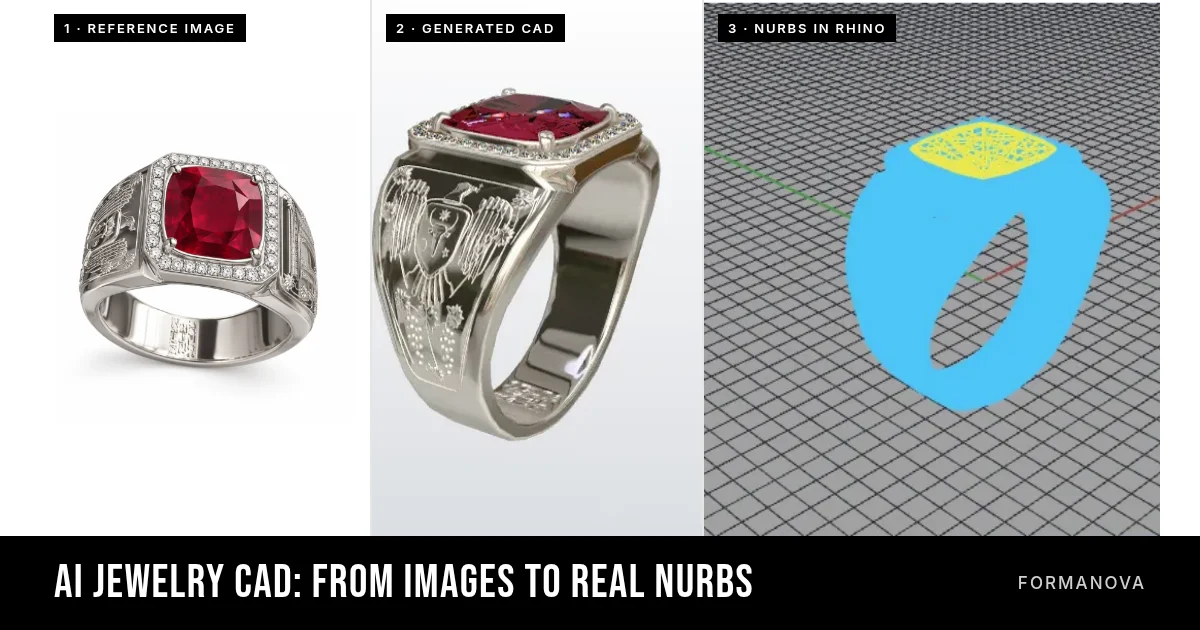
Today, we’re introducing FormaNova’s new AI Jewelry CAD engine, which generates real, editable NURBS geometry directly from jewelry images, sketches, or text descriptions.
Not merely a 3D mesh saved inside a Rhino file. Actual NURBS surfaces and solids, with separate jewelry components, delivered in native Rhino .3dm format.
And for the first time in FormaNova, this capability extends well beyond rings to a broad range of jewelry designs.
The missing step between AI jewelry design and real CAD
Generative AI has made jewelry visualization remarkably accessible. A designer can describe a ring, upload a sketch, or experiment with an unusual shape and quickly produce a convincing image.
Image-to-3D tools go further. They can turn a reference image into a three-dimensional mesh, often exported as STL or GLB. That is useful progress, particularly for organic forms, sculptural details, and visualization.
But a mesh is not the same thing as a structured NURBS model.
A mesh describes a shape using polygons, typically triangles. It can look excellent on screen, and a properly prepared STL mesh can absolutely be 3D printed and cast. The problem is what happens when a designer needs to make precise changes.
Suppose a generated ring has the wrong finger size, a prong that is too thin, or a gemstone that needs a different setting. If the geometry is one fused mesh, those changes may be difficult. The CAD technician might have to modify the mesh in specialized software, reconstruct parts of the design, or use the original mesh merely as a reference while rebuilding the jewelry in Rhino.
This is why professional jewelers remain skeptical of some AI-generated 3D models. The issue isn’t that AI cannot produce attractive shapes. It’s that jewelry CAD must do more than look attractive.
It must remain useful when somebody needs to change it.
What we’ve built at FormaNova
Our work on AI jewelry CAD began with rings.
The first generation of our system produced 3D ring models in GLB format. We subsequently developed a way to generate actual NURBS geometry for rings, allowing the resulting models to be opened and edited in Rhino. Our ring workflow walkthrough from March 2026 documents that stage.
That was an important technical milestone, but the system was still focused on one jewelry category.
Our latest release takes this further. We’ve generalized the image-to-NURBS process so FormaNova can generate structured CAD models across a much wider range of jewelry, including rings, earrings, pendants, necklaces, bracelets, brooches, and more.
The user supplies reference images, a sketch, a rough drawing, or a text description. FormaNova constructs a three-dimensional jewelry model using NURBS geometry.
Rather than treating the entire piece as one undifferentiated shape, it organizes the design into individual components. Depending on the piece, these can include the shank, prongs, stone seats, gemstones, bails, links, clasps, and decorative elements. The resulting file is built in millimeters, with components named and organized into layers.
The goal is straightforward: give jewelry designers actual CAD geometry to inspect, edit, and refine, rather than another visual model that needs to be reconstructed from scratch.
To our knowledge, FormaNova is among the first dedicated jewelry AI services to offer this kind of automated, multi-category image-to-NURBS workflow with native Rhino output.
AI-assisted CAD tools are also emerging inside professional modeling software. Those approaches are valuable. Our focus is different: generating the initial structured NURBS model directly from a visual reference or description, without requiring the user to build it manually through CAD commands.
See the geometry, not just the render
A claim about NURBS geometry is easy to make. The useful test is what the actual file contains.
We’ve published several examples showing the original design references, the generated jewelry models, and screenshots of the files opened inside Rhino. Three of them follow.
Example 1: A ruby signet ring
The first example starts with four reference views of a signet ring featuring a cushion-cut ruby, a surrounding diamond halo, and engraved side panels. No dimensions were given.
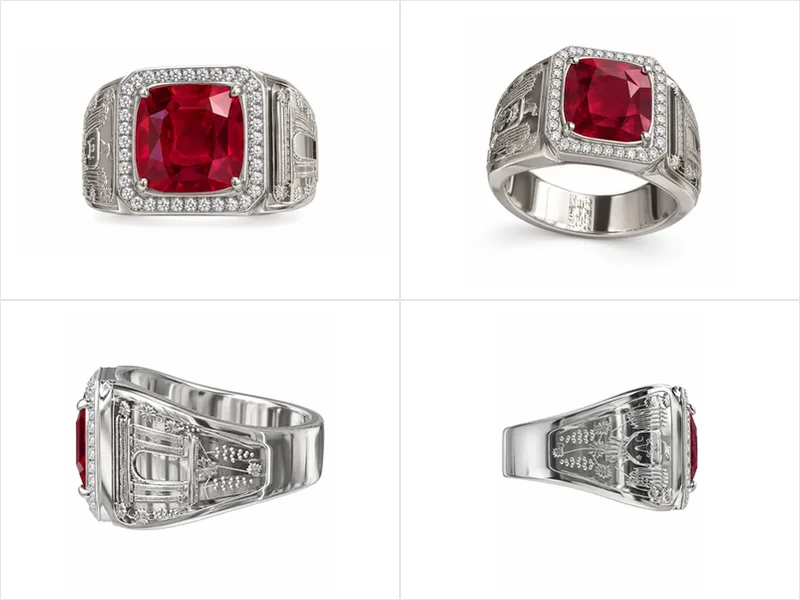
FormaNova uses those references to construct a three-dimensional model with separate metal and gemstone components. The generated file contains 591 objects: the band, the head, the ruby in its seat, four prongs, 36 halo stones each in its own seat, and the two engraved side panels.
The resulting Rhino file can be inspected in multiple viewports, with named objects organized on METAL and GEMS layers.
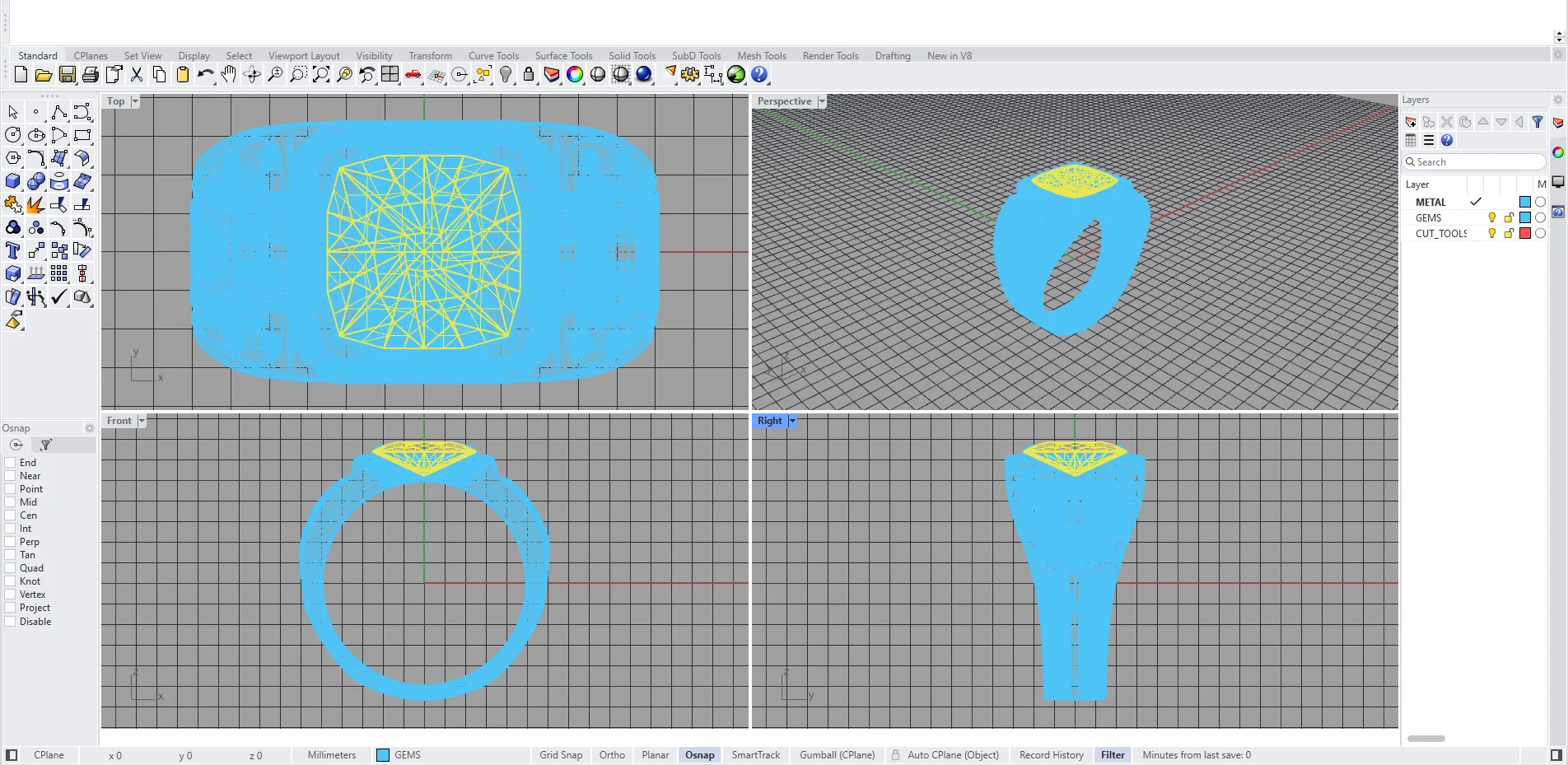
This is also the piece we use in our launch demonstration (video below), where we show the generation process and then open the output inside Rhino.
Example 2: Dragonfly earrings
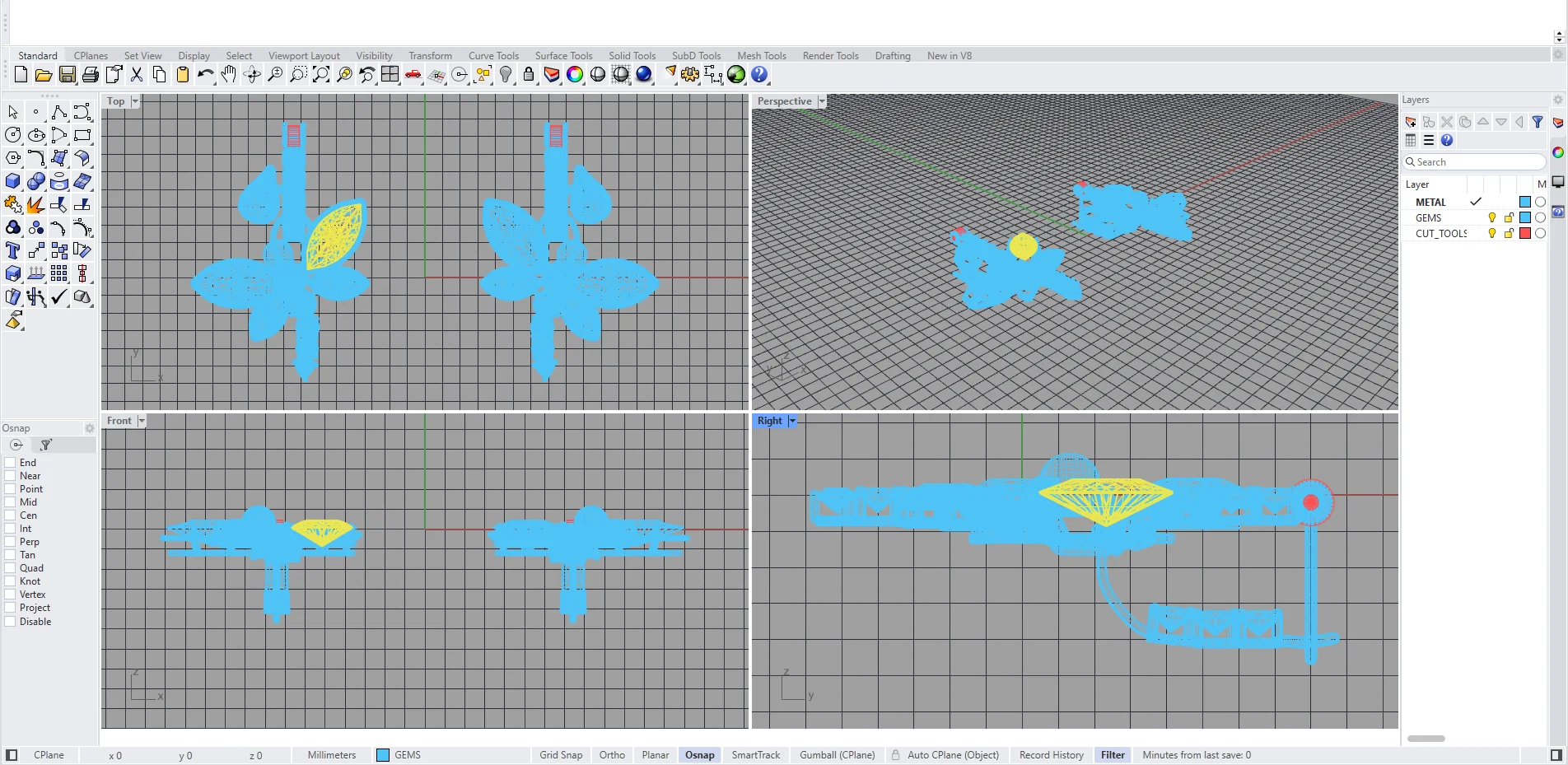
Our second example is a pair of dragonfly hoop earrings with decorative wings, multiple colored stones, and pearl elements. It was generated from four reference photos.
This illustrates a different challenge from building a conventional ring. There are multiple connected forms, repeated elements, and distinct gemstones and metal components.
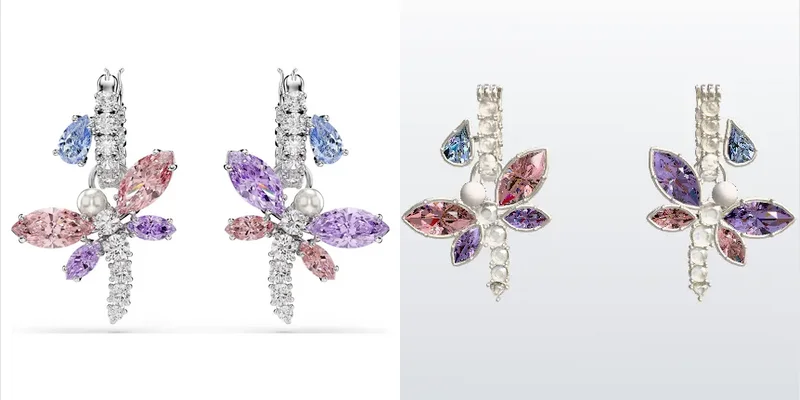
The generated model preserves a part-based structure, allowing the designer to inspect individual elements instead of treating the entire pair as a single mesh. The hoop, the post and hinge, the dragonfly body, the wing stones, the hoop stones, and the pearl are each their own object.
Example 3: A flower ring from a rough doodle
Not every input needs to be a polished rendering or a professional technical drawing. One of our examples starts with a rough flower-ring doodle drawn on a phone.
FormaNova interprets the design and builds a three-dimensional NURBS model from it: a shank, a center bead on its post, and 18 petals in three tiers, each petal with its own rim wire.
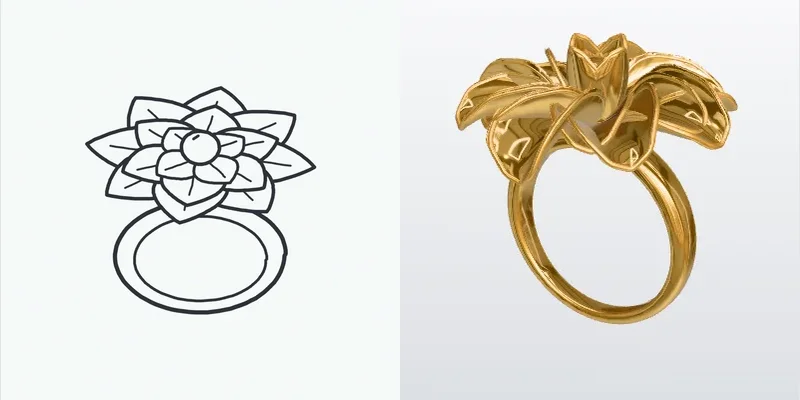
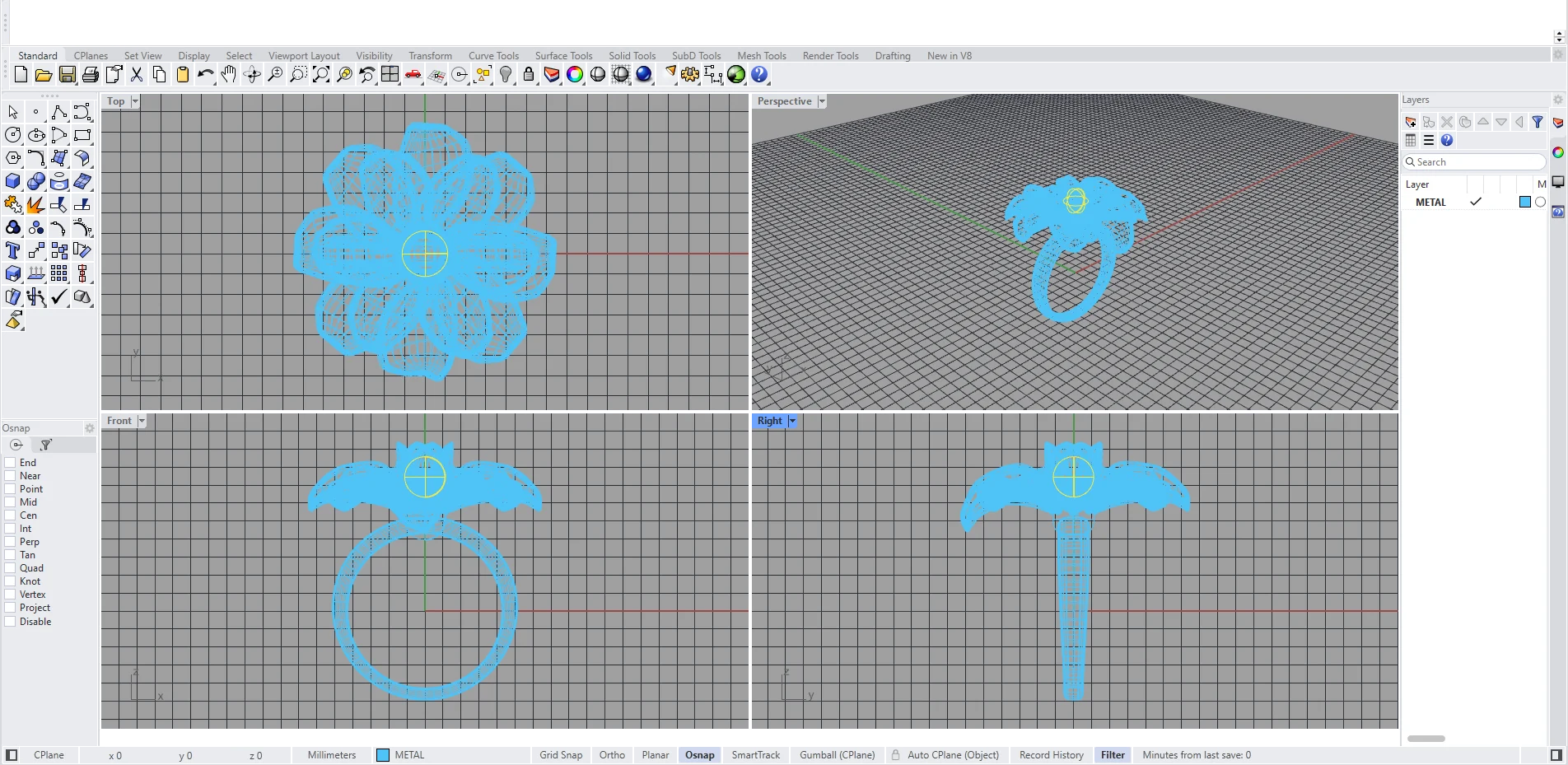
This is a useful illustration of what we’re trying to achieve: reducing the distance between an early visual idea and something that can be worked on in professional CAD software.
You can rotate the models, examine their wireframes, explore their components, and compare the original references on our interactive jewelry CAD showcase.
Watch the workflow
We’ve also published a short demonstration of the full workflow, including the generated .3dm file inside Rhino.
Have a sketch or a reference image of your own? Create your own CAD →
Why actual NURBS geometry matters
NURBS stands for Non-Uniform Rational B-Splines. It is a mathematical way of describing curves and surfaces.
For jewelry designers working in Rhino, the practical benefit is that NURBS geometry supports precise modeling and surface-level editing. A designer can inspect individual surfaces, modify dimensions, replace components, and work on the piece using familiar CAD tools.
- If a setting needs adjustment, it’s useful to have the gemstone, seat, and surrounding metal represented as distinct objects.
- If the customer wants a decorative element removed, it’s useful not to have that element permanently fused into the rest of the design.
- If the piece needs preparation for downstream manufacturing, properly structured geometry gives the CAD technician a more useful place to begin.
There is an important technical distinction here.
A .3dm extension alone does not prove that a file contains NURBS geometry. Rhino files can contain meshes too.
What matters is the actual object type inside the file. FormaNova’s native CAD output contains NURBS surfaces and solids, rather than simply packaging an AI mesh inside a Rhino document.
We also provide STEP for CAD interchange, STL for printing and casting preparation, and GLB for viewing and rendering.
These formats serve different purposes. STL isn’t obsolete or inherently inferior. It is often exactly the format a manufacturer needs at the printing stage. The advantage of NURBS is having a more directly editable representation of the design before that stage.
How the new workflow works
The process begins with a reference. You can upload a product image, a jewelry sketch, multiple views of a design, or even a quick doodle. Alternatively, you can describe the piece in text.
You can also provide measurements such as ring size, stone dimensions, pendant height, or earring drop length. These help guide the generated model, although dimensions should still be verified before manufacturing.
FormaNova then builds the model. Most pieces currently take approximately 30 to 40 minutes, depending on complexity and the number of components.
Once generation finishes, you can preview the jewelry, explore individual parts, apply display materials, and download the CAD files. You can then open the .3dm file in Rhino or MatrixGold to inspect and refine the design.
FormaNova also supports requesting changes in plain language, with versions retained rather than overwriting the previous result.
The workflow is intended to reduce the amount of initial CAD construction required, while keeping the output accessible to the professional tools jewelers already use.
Is AI-generated NURBS automatically ready for manufacturing?
No. And this distinction deserves a serious explanation.
There are at least three separate tests a jewelry model needs to pass.
- Does it represent the intended design accurately?
- Is its geometry structured and editable enough for professional CAD work?
- Does it satisfy the physical requirements of the intended manufacturing process?
These are related, but they are not interchangeable.
A model can have valid, closed NURBS solids and still contain a shank that is too thin, a stone seat that needs correction, or prongs that leave insufficient material for the setter.
Real jewelry must survive casting, finishing, stone setting, and everyday wear. That means considering wall thickness, stone dimensions, setting clearances, material properties, structural support, and the practical requirements of the workshop producing the piece.
We’ve been working directly with professional jewelers and incorporating their feedback into FormaNova’s CAD generation process. Wall thickness, stone settings, and casting requirements already inform how the system builds jewelry. These are not simply problems we’ve left for somebody else to solve.
We’ve also been sharing early CAD results with jewelry designers and manufacturers and inviting them to identify problems.
The feedback has been specific. A model might capture the overall design while getting a gemstone’s proportions wrong, adding too many stones to a halo, or placing structural elements differently from the reference. And even when the geometry is technically valid, its settings and dimensions may still need correction before manufacturing.
These are not minor details. They determine whether a generated model actually saves a CAD technician time.
That is why we’re working on more than generating NURBS. We’re also improving design fidelity, dimensional accuracy, stone settings, and the practical requirements of manufacturing.
The goal isn’t simply to produce a model in 30 minutes. It’s to reduce the total work required to get from a design reference to usable jewelry CAD.
But we also recognize that different designs pose different difficulties. A relatively straightforward piece may require little refinement. A more intricate design, unusual setting, or complex assembly may require greater professional intervention.
For now, a jeweler or manufacturer should inspect the CAD and make any necessary adjustments before production, just as they would with other CAD files entering their workflow.
Our aim is to reduce that remaining work over time, not pretend it has already disappeared.
What changes for professional jewelry designers?
We don’t think the interesting question is whether AI will replace jewelry CAD designers.
A more useful question is: Which parts of jewelry modeling can now be automated, and where does professional expertise create the most value?
Today, a jeweler using an AI mesh generator may have to spend considerable time recreating the design as editable CAD. With direct NURBS generation, that starting point can change. The designer can begin with an existing CAD model, examine its structure, correct its dimensions, improve stone settings, refine difficult geometry, and prepare it for manufacturing.
That still requires judgment. Knowing whether a piece will cast successfully, whether a prong can securely hold a stone, or whether an attractive design will be comfortable and durable requires knowledge that goes beyond producing a three-dimensional shape.
Our objective is to make that expertise more productive.
There’s another possibility we’re particularly interested in.
As AI makes it easier for people to create their own jewelry designs, more customers may arrive with ideas they previously couldn’t communicate, let alone model in 3D. That could create more demand for custom jewelry, and potentially more opportunities for the professionals who know how to make it.
But there is a distinction between generating a design and knowing how to manufacture it.
We believe professional expertise will remain important, even as more of the initial CAD construction becomes automated. The work may increasingly involve inspecting, correcting, refining, and validating designs rather than building every component from scratch.
Whether this leads to more work for CAD professionals will depend on how much the custom jewelry market grows and how much of the remaining workflow AI can reliably automate. We don’t know the answer yet.
But we see a future in which far more people can create jewelry concepts, while skilled professionals help turn those concepts into pieces that can actually be made and worn.
That’s a future we’re interested in helping build.
A new starting point for jewelry CAD
FormaNova’s original ring-generation experiments were a first step. Generating NURBS models for rings was the next. Today’s release expands that capability across jewelry categories.
It doesn’t mean every jewelry design can now be manufactured without intervention. It means an important part of the journey from idea to professional CAD can increasingly be automated. And that is a meaningful change.
The next challenges are equally clear: more accurate geometry, better handling of complex designs, more reliable stone settings, tighter dimensional control, and stronger manufacturing validation. We’re working on them.
In the meantime, we’d rather let jewelers examine the results than ask them to take our word for it.
Explore FormaNova’s AI Jewelry CAD showcase to see the reference images, interactive models, and Rhino outputs.
Better still, try a piece you’ve already modeled. Open FormaNova’s .3dm alongside your existing CAD and compare them.
That’s the kind of scrutiny that will help this technology improve.